01 / IDENTIFICATION
The right asset, every time.
Tap a protected NFC tag with a compatible phone or reader to identify the item. The tag provides an identifier, not the stored inspection records. Serial-number search remains a fallback.


A safety equipment management system built around the actual equipment, the people who use it, and the events that matter — from first issue and pre-use checks to servicing and return.

Watch our short introduction to RISE. The original video illustrates the concept; the screenshots and workflows further down this page show how the system is used today.
NFC identification is the start. The value comes from the equipment record, the person responsible and the history of what actually happened.
Why did we choose NFC? Read the explanation →An office assignment says where equipment should be. RISE is designed to capture a real scan and a named person's acceptance — then keep subsequent events connected to that same asset.
Tap a protected NFC tag with a compatible phone or reader to identify the item. The tag provides an identifier, not the stored inspection records. Serial-number search remains a fallback.
An operator receives the tagged equipment and signs it out using their own credentials. It stays assigned to them until returned, and other users cannot independently book out that same asset.
Recorded pre-use checks, reported faults, service events, component changes and custody movements contribute to an auditable equipment history.
These are real screens from the RISE equipment-management platform, not generic illustrations. Open any one to see how the records connect.
Identify the item, see its current status and access the record behind it.
Keep fitted components and relevant expiry details linked to the parent asset.
Review recorded service, custody and other asset events in one place.
RISE replaces an unverified administrative allocation with a scan-verified custody event. The operator receives the physical item, taps its NFC tag and signs it out under their own account.
The actual equipment is passed to the operator rather than merely assigned to them in a spreadsheet or dashboard.
The authorised operator scans its NFC tag using their own mobile app and credentials. RISE records the check-out event.
The asset remains assigned and visible in that operator's app until they book it back in. It is unavailable for another operator to book out independently.
An operator doesn't need to rescan their assigned lifejacket or harness every time they want to complete a pre-use check, read a certificate or report an issue. Their equipment stays in the app until returned.
For operators managing many assigned items, a quick NFC scan opens the matching asset profile without scrolling through a long list.
A meaningful history cannot be built from office records alone. RISE lets an assigned user record what they observe during real work, while keeping the paperwork and status available when needed.
Record the checks completed before use. The history shows recorded checks, not an assumed count of every actual use.
Log an issue against the specific asset and make the problem visible for assessment and follow-up.
Capture relevant context such as chemical exposure, contamination or the job being carried out.
Check manuals, certificates, relevant child components, service dates and any reported issues.
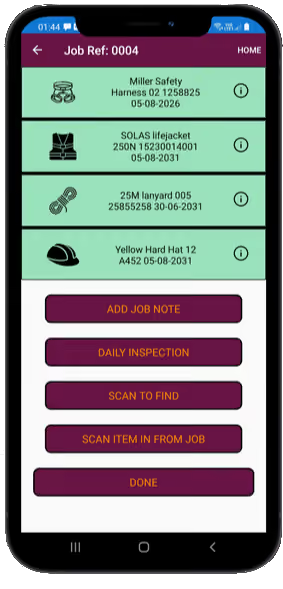
Once equipment has been signed out, its record stays accessible to that operator until it is booked back in. They can review their assigned items, carry out pre-use checks, report problems and retrieve the permitted equipment information without repeating the initial scan.
The image shown is the existing RISE mobile illustration; the workflows described here reflect the current system.
RISE uses operational status categories including Fit for Purpose, Under Monitor and Not Fit for Purpose. An item restricted as Not Fit for Purpose cannot be signed out by an operator; any reported defect should be assessed through the appropriate process.
When someone books out equipment, completes a pre-use check, adds a job note or reports a defect, RISE records the action in the asset's immutable history, including the user, date, time and a GPS coordinate where available. Simply reading a manual, viewing a certificate or browsing an asset does not trigger a GPS ping.
Booking equipment out · pre-use checks · job notes · problem reports
Location recorded where availableViewing manuals · reading certificates · browsing equipment information
No GPS ping for viewingRISE does not continuously track staff location. Coordinates for auditable mobile actions depend on the device's location availability and permissions.
An asset may include components that need their own identification, status, service information or expiry monitoring. RISE links those child components to the main asset record.
CO₂ cylinders, automatic firing cartridges, lights and PLBs — with relevant batch numbers, serial numbers and expiry or replacement dates where applicable.
A connector assembly may have a tracked carabiner as a child component. An issue with that component can be recorded and followed up through the equipment record.
Not every component carries an individual serial number. RISE records the appropriate identifiers and information for that component type.
Five days before an item's scheduled service date, RISE automatically changes its operational availability to Not Fit for Purpose, preventing it from being newly booked out. The current mobile holder receives a push notification prompting its return for servicing or replacement.
This is a deliberate circulation control: an item may still be within its service interval when the five-day restriction begins. The system restriction does not, on its own, mean that the equipment has failed an inspection or is already legally non-compliant.
Five-day pre-due rule restricts new issue.
A push notification prompts the return of equipment currently in custody.
The item can be booked back in and prepared for its next inspection or service.
When equipment needs attention, RISE can connect the service order to the actual items sent, the box they were packed into, the receiving scans and the eventual service outcome.
Identify the items requiring inspection or servicing and create a service order.
Physically scan equipment into the shipment so the order records the items and quantities contained.
Generate a box label and record the preparation and dispatch of the shipment.
Receiving staff scan equipment out of the box to confirm what actually arrived.
The item is identified again as inspection and servicing work takes place. Service outcomes, relevant component changes, records and certificates can be linked to its equipment history, alongside the order and receiving events.
Learn about RISE servicing →Equipment can be sent to other service providers. On return, users can confirm receipt by scanning the actual items, then upload external certificates and record the outcome, including pass, fail or condemned where appropriate. A full step-by-step service history depends on whether the external provider also uses RISE.
Stop hunting through emails for installation drawings, risk assessments and technical records. RISE brings the scope of work, assigned equipment, supporting documents and job communications together.
A document can also be associated with the individual equipment record, helping the next person find the relevant information long after the original job.
A structured inspection process keeps the correct equipment, checklist, inspector, notes and outcome connected to the asset. RISE Safety uses this workflow today; customer access for competent in-house inspectors is planned.
Scan the asset's NFC identifier to open the correct equipment record.
Complete the relevant checklist and record observations, notes and photographs as required.
Record the inspection outcome against that individual item.
Continue to another item in the session or finalise the recorded work and documentation.
Look up an asset and its associated certificates, or search the completed certificates register. Different certificate sources remain clearly identified, so you can tell who inspected the equipment.
Certificates issued following servicing or inspections completed by RISE Safety, linked to the relevant equipment.
Upload third-party certificates and associate them with the right equipment and service history.
Planned customer access: company-branded inspection records, clearly marked internal and identifying the competent person who performed the work.
RISE doesn't charge you more because you register more safety equipment, attach another certificate or create another servicing job. Every paid subscription includes the full equipment management system. Your subscription price is based on the number of licensed users, not how thoroughly you use it.
Register and manage the equipment you need, without asset-count upgrades.
Build a proper history for every item, without paying per inspection.
Keep service certificates, third-party documents, manuals and supporting records linked to equipment.
Use the job, service-order and workshop workflows without a quota on jobs or records.
Equipment custody, NFC tracking, defects, servicing, records and reports are not locked behind higher feature tiers.
Start with the users included in your plan, and add licensed users as your team grows.
There are no per-asset, per-certificate or per-document charges under the current subscription model. Standard security, acceptable-use and technical safeguards still apply.
See user-based pricing →RISE is a web-based equipment-management platform with a complementary mobile app. NFC provides a practical way to identify and physically interact with the same equipment record in different settings.
Operators use compatible NFC-enabled phones to accept assigned equipment, carry out pre-use checks, report problems, add job notes, and view the records relevant to their work.
Authorised users manage assets, components, statuses, servicing, certificates, locations, accounts and service orders using the desktop platform.
Use a dedicated NFC reader or RISE's mobile NFC Bluetooth keyboard emulator to pass a scanned identifier directly into the web application.
RISE uses the tag's unique identifier to look up the equipment record. Inspection histories and certificates are held in the system, not on the NFC tag. Users must be authenticated and have the relevant company permissions; another company's registered user cannot simply scan into your records.
If a tag is damaged, a replacement identifier can be linked to the same asset without changing its original manufacturer serial number or losing the underlying history.
See why RISE uses NFC rather than relying on QR codes or longer-range RFID →RISE is not tied to a single manufacturer, equipment type or industry. The same recordkeeping principles can apply across different assets and teams.
Lifejackets, survival equipment, vessel-based safety gear and associated expiry-controlled components.
Harnesses, lanyards, connectors, anchor-related equipment and inspection histories across projects.
Fire safety items, portable equipment and planned inspection requirements across sites and teams.
Track assets assigned across workshops, depots, vehicles, field operations and multiple locations.
RISE supports recordkeeping, inspection scheduling and equipment control. It does not replace physical inspections, competent assessments, manufacturer instructions or the organisation's legal obligations.
RISE pricing is based on users, not the number of assets entered. The existing subscription structure and service-customer terms are shown below.
Already have equipment inspected or serviced by RISE? Your organisation receives one complimentary company administrator account to view its equipment, inspection reports, service certificates and records. This records access is included with our work; the full equipment management subscription below is optional when you want additional user roles and advanced workflows. There are no per-asset, inspection-record or certificate charges.
Explore the number of users you need and see an indicative monthly or annual subscription. The paid system is optional: RISE inspection and servicing customers already receive one complimentary company administrator account for access to their equipment records and documents.
Talk to RISE about your account →The optional full equipment management subscription is separate from the complimentary company administrator access provided to RISE inspection and servicing customers. Eligible regular RISE servicing customers receive a 50% subscription discount while an active servicing relationship is maintained, with equipment submitted for inspection or servicing at least once every 12 months. If eligibility ends, standard subscription rates apply. The 50% service customer discount cannot be combined with the 10% annual billing discount. Ask RISE about eligibility, charitable access and any special arrangements.
Tell us what equipment you manage, how it's issued and how servicing currently works. We can show how RISE could fit your operations — whether you manage one equipment store or several sites.
Tell us what equipment you manage and what you’d like the system to help you achieve.
INSPECTION · SERVICING · DIGITAL RECORDS
Equipment safety is a process.
We're here for the next step.
From a single inspection to ongoing servicing and equipment management, RISE works with your organisation to keep things joined up.
Practical safety equipment inspections, lifejacket servicing and connected equipment management — backed by clear records and a collaborative approach.
BASED IN NAIRN · SERVING THE HIGHLANDS & BEYOND
Contact & location
01463 357018See email & contact optionsNairn, Scotland
Collection, site visits and drop-off by prior arrangement.
Drop-off by appointment only